











Blog
Technical Post: “Sync Me Up Scotty”
Pivoting from On-Prem to Cloud via Synced Identity Abuse.

Dynamic groups in Microsoft Entra ID allow organisations to automatically manage group membership based on user attributes such as department, job title, or location. Instead of relying on manual group administration, rules are defined once and automatically enforced whenever a user’s attributes change.
This is commonly used in larger organisations to grant access to resources like internal applications, SharePoint sites, or SaaS platforms. For example, a group might include anyone whose job title is "HR Analyst", and that group could be granted access to the HR portal or sensitive payroll data. In hybrid environments, these user attributes are usually managed on-premises. When an attacker compromises the on-prem domain, they can change attributes like department or jobTitle on accounts that sync to the cloud. If dynamic group rules rely on those fields, attackers can effectively self-enrol into privileged groups, without ever touching the cloud directly.
In the next section, we’ll demonstrate exactly how this works using a test lab setup and a dynamic group designed to simulate access to invoice payments.
To demonstrate this attack path in a controlled environment, we built a simple hybrid identity lab consisting of:
A Windows Server 2022 domain controller hosted in Azure
A Microsoft Entra ID tenant with default configurations
Azure AD Connect
A test user account created in the on-prem Active Directory and synced to the cloud
A dynamic group in Microsoft Entra ID named Finance Controllers, configured to automatically include users with the job title FCO
A fictional business description attached to the group, indicating that it grants access to invoice payments
This setup allows us to demonstrate how, after compromising the on-premises environment, an attacker can abuse attribute synchronisation to gain cloud-side group membership and, by extension, access to sensitive business data.
With control over the on-premises domain or objects, the attacker has access to Active Directory Users and Computers or can modify attributes using BoF's or C# Based tools. Because the environment is using Azure AD Connect to synchronise identity data into Microsoft Entra ID, any attribute changes made to synced users will flow into the cloud.
In this case, we have a dynamic group in Entra ID named Finance Controllers:
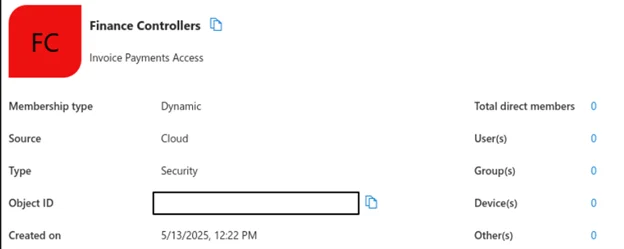
which is configured with the following dynamic membership rule:
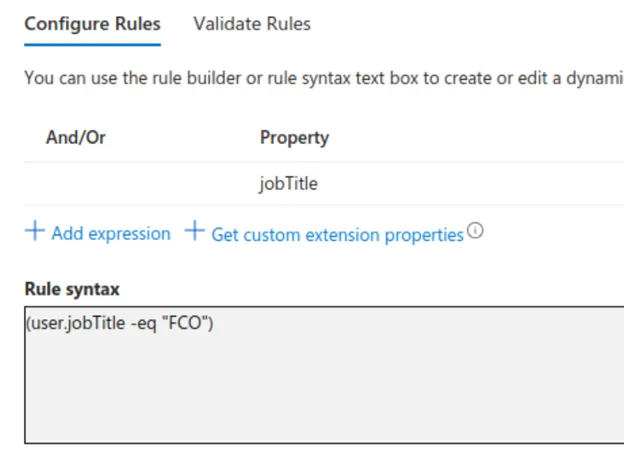
These rules can be easily obtained by using RoadRecon or any number of methods to enumerate Entra based groups.
The group is described as providing Invoice Payments Access, simulating access to financial payments/invoices in this example.
Our synced user, in this case, syncmeup, does not initially meet the membership criteria for this group as seen below by the current jobTitle that is set:

This can also be seen in Entra:

However, this output confirms that the Title attribute does not match the requirement for the Finance Controllers group, meaning the user is not currently eligible for dynamic group membership.
At this point, with control over the on-premises domain, the attacker has the ability to escalate the privileges of the synced user. By modifying a single attribute, one that is fully trusted by Microsoft Entra ID, they can force the account to be included in a sensitive cloud group without any cloud-side interaction.
We can now modify the Title attribute to match this Dynamic Rule:

Rather than taking any additional action, the attacker can now simply wait for the next scheduled synchronisation cycle to take place, which by default occurs every 30 minutes. Once the change is synced, Microsoft Entra ID will reevaluate the dynamic membership rule. Because the user's Title now matches the condition (user.jobTitle -eq "FCO"), the account is automatically added to the Finance Controllers group.
After waiting for the next scheduled sync cycle, the changes were successfully reflected in Microsoft Entra ID. The syncmeup user's jobTitle attribute had updated in the cloud, and Entra applied the dynamic group membership rule as expected which can be seen below:

The user was now a member of the Finance Controllers group:
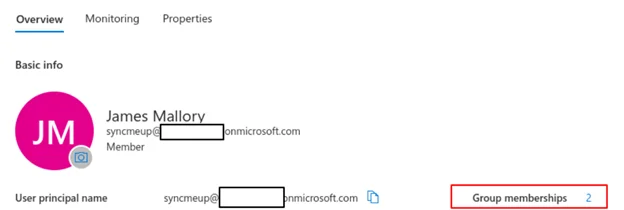
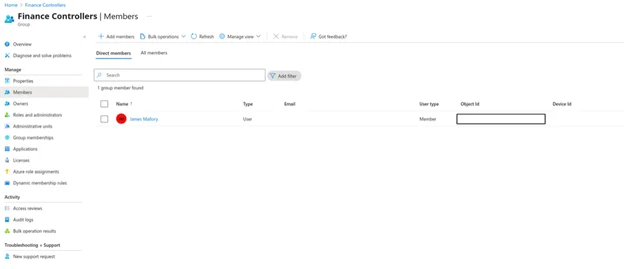
From an attacker's perspective, this completed the privilege escalation. Any access tied to that group, such as a financial application, internal portal, or delegated permissions, was now available to the account.
We have found this to be particularly useful when compromising accounts that are not subject to MFA but are synchronised from on premise. This attack can be repeated numerous times to hop through multiple different groups that may be available to harvest information or access to systems.
This same abuse of dynamic groups can also be applied if organisations are failing to harden rules whilst also allowing guest access with attackers able to add guest accounts with for example guestADM@company.org to trigger rules such as account name contains "ADM" without specifying that they must be a full member.
These exploit paths have been seen numerous times in real engagements and although dynamic groups greatly simplify the administration and control of group memberships. If rules are poorly designed combined with domain misconfigurations it can present an interesting opportunity for lateral movement within Entra.
There are a number of actions you can take to eliminate or reduce the risk of these forms of attacks.
Use Attribute Filtering. If your on-boarding process is primarily cloud based with users created in the cloud, then synchronised on premise you can implement attribute filtering to prevent synchronisation of attributes to on premise users. However, it is not without its drawbacks as this will restrict the synchronisation for this attribute on all users and if you want to use these attributes within your local AD for groupings, membership or access it may cause issues.
Don't use dynamic groups for sensitive system access. Dynamic groups can be great for organising basic access and grouping users. But if these groups are used to provide access to highly sensitive systems it can pose a risk, at that stage you are always relying on having strict rules. Which if an attacker has suitable control of a local domain may never protect you.
Monitor AD Attribute Changes. Depending on your environment it may be possible to implement detection logic around known high value attribute changes. These rules should be highly tuned particularly to avoid large amounts of noise if automation functions are used during on-boarding, user creation or update processes. Focus alerting on known high value attributes used by your dynamic groups.
Alert on new group membership on Entra Dyanamic Groups. Monitor and alert for new memberships to known high value dynamic groups. If these events have occurred outside of on-boarding, ticket actions or change controls then this can be used as key indicator.
Share your challenge with us and we’ll help you find the right level of support for your business.