











Blog
GuardNest Release 3.7: Inside the new Cyber Essentials experience
Cyber Essentials is now integrated into GuardNest, making certification and renewal simpler than ever.
Discover how live progress tracking, team collaboration, built-in guidance and automated checks help reduce admin, streamline assessments and make cyber security compliance easier to manage.

Cyber Essentials is now simpler than ever.
Cyber Essentials now lives in GuardNest. From the first question to your annual renewal, the whole certification journey runs in the same platform as your scanning, assets and training.
The aim is simple: make certification part of how you manage security every day, not a project you scramble to prepare for once a year. Here is what the release includes.
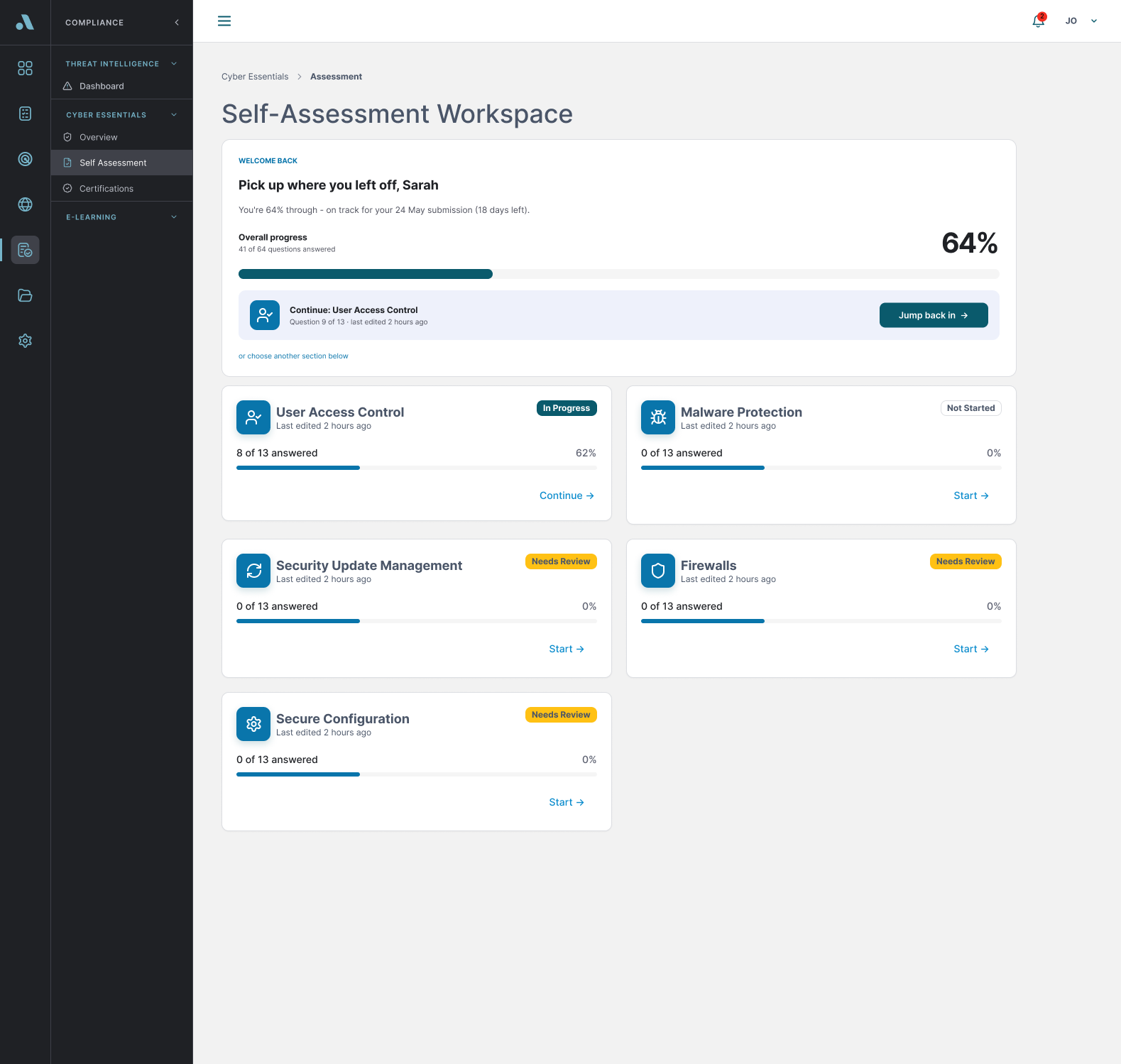
A live assessment space
Your assessment is no longer a document passed between colleagues. It is a working area inside GuardNest.
Work in any order: every section is visible from the start, from your organisation's details and certification scope through to the five technical controls, so you can answer what you know today and return to the rest once you have the detail.
Track progress as you go: each section shows its own completion percentage, alongside an overall figure for the whole assessment, and both update as answers go in.
Never lose your work: answers save automatically, and you pick up exactly where you left off, even after a closed laptop or a timed-out session.
Collaboration built around your team
Assessments usually stall for one reason: no single person holds every answer. Firewall settings sit with IT, device policies sit with whoever handles starters and leavers, and the person who owns the certification often controls neither.
Assign questions: send individual questions to the right colleague. They receive a notification, answer their questions and can view the wider assessment for context without being able to edit it.
Stay in control: the assessment lead keeps full control throughout, and anyone who needs to change an answer outside their remit can request access from the lead rather than working around the process.
Comment and tag: discuss any question and tag colleagues, just as you do elsewhere in GuardNest. Comments stay attached to the question and are visible to your team only.
Guidance next to every question
Each question carries the official NCSC guidance alongside advice from our own assessors: what a passing answer looks like, the mistakes we see most often, and practical tips from organisations like yours. Help is there at the moment you need it, not buried in a document you read weeks ago.
Early feedback before you submit
As you answer, GuardNest checks your responses against the scheme requirements, shows whether each one looks likely to be compliant and gives written feedback on anything that might not be. The aim is to catch answers that would otherwise come back as non-compliant after you submit.
Context-aware: checks read the supporting note on an answer as well as the answer itself, which matters for answers such as “yes, with an exception”.
Consistency checks: an answer that contradicts something you said elsewhere in the assessment is flagged, a common and avoidable reason applications fail.
Pre-submission review: a summary screen lists every question as complete, flagged or unanswered, with one click to jump to any of them. You cannot submit with unanswered questions, and you are warned about any remaining flags before you send.
This is an early warning, not the certification decision. That stays with an assessor.
Faster board sign-off
Cyber Essentials needs approval from a board-level representative, and this is often where applications sit for weeks.
No login needed: nominate your signatory and they receive a secure link. They confirm their email address with a one-time code, so there is no GuardNest account to create and no password to remember.
Quick review: they see your answers in one scrollable list, then sign or send it back with a comment, and your team is notified straight away.
Evidence on record: every sign-off is recorded with the date and signatory, ready for auditors, insurers or customers.
Automatic reminders: if the sign-off sits unactioned, GuardNest chases the signatory so you do not have to.
A fixed question set from start to finish
Question sets change between scheme versions, and a change halfway through an assessment can catch you out at the worst moment. Each assessment is now locked to one questionnaire version for its whole life. New versions apply to your next application, and where questions carry over, your previous answers move with them.
Direct integrations
GuardNest connects directly to the IASME API for question sets and submission, and to Companies House so your registered company details fill in automatically.
Renewal that does not catch you out
Your certificate lives in GuardNest alongside the application that earned it. As the expiry date approaches, GuardNest reminds you in good time, so renewal starts from the platform rather than from a diary entry someone forgot to set.
What stays the same
The scheme itself is unchanged. The questions come from IASME, the requirements come from the NCSC and the certification decision belongs to your assessor. What we have changed is the weeks of admin that used to surround it.
What comes next
This release is part of a much wider investment in GuardNest. We are continually adding new capabilities, refining existing workflows and acting on customer feedback, so every release makes a real difference to how you manage security and certification.
If you already use GuardNest, explore the new Cyber Essentials experience and see how much time it can save your team at your next certification or renewal. New to GuardNest?
Speak to our team to start your Cyber Essentials journey.
Share your challenge with us and we’ll help you find the right level of support for your business.